

Learn how to blog around your IDX pages using Showcase IDX to boost SEO, attract local buyers, and build a steady stream of high‑intent traffic.
Focus blog content on neighborhood insights, buying tips, and listing highlights that naturally point people to the right IDX pages to convert. Keep posts practical and local so your site ranks for useful searches and visitors find listings that match their needs.
Key Takeaways
- Use short, local-focused blog posts to support your IDX listings.
- Link blog content directly to relevant IDX pages to increase leads.
- Optimize posts for search and clear calls to action to boost conversions.
Understanding IDX Pages and Their Role in Real Estate Blogging
IDX pages connect your site to MLS data so visitors see live property listings. They work like a dynamic property catalog, boosting search visibility and capturing buyer intent when you add focused blog content.
What are IDX Pages and Internet Data Exchange?
IDX (Internet Data Exchange) lets your real estate website display MLS listings directly. An MLS feed pushes listing data—photos, descriptions, price, status—into your IDX website, so pages update automatically when agents or brokers change the MLS.
You get indexable listing pages for each property address. Search engines can find and rank individual listings, which helps local SEO.
IDX also supports property search tools and saved searches for visitors. Rules from local MLS boards control what you can show and how you present agent info, so follow those rules and use an IDX provider that supports your MLS feed to avoid compliance headaches.
The Value of IDX Listings on Real Estate Websites
IDX listings turn casual visitors into leads by showing active homes that match search intent. When buyers search for neighborhoods, price, or beds, an IDX property page gives real examples and contact options.
Listing pages keep traffic on your domain instead of sending visitors elsewhere. They also increase page count and keyword opportunities, which boosts organic visibility for local searches and specific addresses.
Use IDX with lead capture features like saved searches, alerts, and contact forms. Those capture buyer intent and feed your CRM for follow-up.
Key Differences Between IDX Pages and Traditional Blog Posts

IDX pages are data-driven and focus on properties. They pull structured MLS data: price, status, photos, and location.
Blog posts are narrative and add context—market trends, neighborhood guides, or buying tips. An IDX page’s goal is search and conversion: show exact listings and collect inquiries. Blog posts aim to educate and rank for informational queries. Combine them: link a neighborhood guide to relevant listing pages to guide readers from research to action.
You should treat IDX pages as evergreen inventory that changes with the market. Treat blog posts as entry points that target questions and drive users toward specific listing pages or saved searches. For competitive markets, consider writing content that answers buyer questions and points to matching listings or alerts like those on Is Zillow Stealing Your Buyers Online?
Setting Up IDX Integration for Your Blog
You’ll need a stable IDX feed, a reliable plugin, and MLS approval before you can publish listing-driven posts. Focus on the provider, technical setup, and platform so your blog stays legal, fast, and easy to manage.
Choosing an IDX Provider and Plugin
Pick an IDX provider that matches your budget, MLS coverage, and lead tools. Look for providers known for good support and frequent MLS updates—think IDX Broker, iHomefinder, or Showcase IDX.
Compare features like lead capture forms, saved searches, map search, and SEO-friendly listing pages. Check pricing tiers and whether the provider includes hosting, CRM links, or extra developer APIs.
For WordPress, choose a plugin that integrates cleanly with your theme and page builder. Test the plugin on a staging site to confirm shortcodes, widgets, and mobile layout work correctly.
If you want strong lead-gen features, read a practical review like why some agents use Showcase IDX for lead generation and factor that into your decision.
Technical Setup and MLS Approval
Create an account with your chosen IDX provider and request MLS access. MLS boards usually require broker or agent credentials and a signed agreement. Submit required documents early to avoid delays. Your provider often helps with MLS rules, display requirements, and copyright credits.
On your site, install the WordPress IDX plugin or add the provider’s JavaScript widget—Configure API keys, webhook endpoints, and caching so listings update without slowing your blog. Set up redirects and canonical tags to avoid duplicate-content issues. Keep technical support contact info handy—you’ll need it when feeds break or MLS changes rules.
Popular Platforms for IDX Blogs
WordPress is still the most flexible platform for IDX blogs because of all the IDX plugins and SEO tools out there. Use themes built for real estate and a page builder that supports listing templates.
If you use WordPress IDX plugins, check compatibility with your hosting, PHP version, and caching plugins. Some providers offer site builders or hosted solutions if you’d rather avoid technical stuff, but those can limit custom design and SEO control.
When choosing, weigh long-term SEO and speed against ease of setup and included support. It’s a trade-off—just depends on what you want to manage.
SEO Foundations for Blogging Around IDX Pages

Make your IDX pages easy for search engines to access, skip duplicate content, and add technical signals so listings and blog posts can rank together. Focus on crawlability, canonical rules, XML sitemaps, and structured data to connect your IDX content with your blog.
Making Your IDX Pages Crawlable and Indexable
Don’t block IDX pages in robots.txt or use noindex tags. Check your robots.txt and meta tags in your CMS and IDX settings so listing pages can be crawled and indexed.
If your IDX provider serves pages on a subdomain, set up a custom subdomain so SEO credit goes to your domain, not the provider’s. Confirm pages render right to Googlebot by testing URLs in Google Search Console’s URL Inspection.
Look for rendering issues caused by JavaScript. If listings load via JS, make sure you have server-side rendering or pre-rendering in place.
Use internal links from your blog to key IDX pages. Link with keyword-rich anchor text from neighborhood guides or market reports to strengthen topical signals.
Keep navigation simple so crawlers reach listings within a few clicks. Don’t bury your best pages.
Managing Duplicate Content and Canonicalization
IDX feeds often create lots of similar pages. Use rel=”canonical” to point duplicates to the preferred URL.
If IDX pages appear both on your domain and the provider’s domain, canonicalize to your domain or use 301 redirects for the versions you control. Avoid thin, boilerplate listing descriptions.
Add unique content on your blog and on template areas—like neighborhood context, buyer tips, or market stats—so search engines see real value. When you syndicate listings across pages, set a clear canonical strategy and track those pages in Google Search Console to catch indexing oddities.
If your IDX system creates parameterized URLs, use canonical tags or URL parameter handling in Search Console. That reduces crawl waste and keeps ranking signals on one URL per property.
Setting Up XML Sitemaps and Structured Data
Include IDX listing URLs in an XML sitemap and keep it updated. Submit the sitemap in Google Search Console so new listings get discovered quickly.
Split large sitemaps into smaller files if you list tons of properties. Use a sitemap index to keep it tidy.
Add schema markup to both listings and related blog posts. Use Property, Offer, and Place schema where it fits to give address, price, availability, and geo data.
Structured data helps search engines understand listings and can enable rich results for your pages. If your CMS or IDX plugin doesn’t output schema correctly, generate JSON-LD snippets on your blog template.
Monitor sitemap status and structured data errors in Search Console. Fix warnings about missing fields or invalid markup. For keyword research to find topics that link well to listings, try a tool like SpyFu to dig up competitive terms and ideas.
Creating Compelling Blog Content That Enhances IDX Pages
Good neighborhood context and smart linking make IDX pages more useful to buyers and better for search. Focus on unique guides, strong featured listing write-ups, and internal links that connect your content to property detail pages and neighborhood pages.
Writing Unique Neighborhood and Community Guides
Write neighborhood guides that answer real buyer questions: commute times, school district ratings, park names, and typical home styles. Start with a short overview, then list key facts like median price range, transit options, and nearby landmarks.
Add short practical tips for residents—best coffee shops, safety notes, or timing for local markets. Link each guide to the neighborhood pages and community pages on your site so visitors can move from broad context to specific property detail pages.
Use bullet lists for quick facts and bold the most useful numbers. Don’t get too fancy—just make it easy to scan.
Highlighting Featured Listings and Local Attractions
When you profile a featured listing, pull in neighborhood context to make the property feel placed. Describe the property with concise details, mention the closest school and park, and note walking distance to transit or landmarks.
Include two or three clear selling points tied to the area, like a top-rated school or a popular farmers market. Pair listings with short spotlights on local attractions to show lifestyle fit.
Use a small table or bullets to match listing features with nearby draws (e.g., “3 beds — 0.4 miles to Riverside Park”). Link the featured listing to its IDX property detail page and the neighborhood guide so readers can explore both the house and its surroundings.
Using Internal Linking to Boost Engagement and SEO
Build an internal linking plan that connects neighborhood guides, neighborhood pages, and property detail pages. Use descriptive anchor text like “Oakwood neighborhood guide” or “property detail page” so users and search engines know what’s up.
Limit links in a paragraph to one or two so the text stays readable. Create a simple template for links in each post: one to the neighborhood page, one to community pages or school district info, and one to the featured listing.
Track clicks to see which links drive visits and adjust placement. Internal links should guide readers deeper into your website and keep them on IDX pages longer.
Optimizing IDX Listing Pages for Search Engines
Focus on clear page titles, useful meta descriptions, rich media on detail pages, smart CTAs, and gentle registration flows. These moves help search engines index your pages and help buyers find and act on listings.
Crafting Effective Page Titles and Meta Descriptions
Write a unique page title for each property that includes the address, city, and one key feature (for example: “3‑Bed Craftsman — 123 Main St, Long Beach”). Keep titles under 60 characters so search engines show them fully.
Put the most important words first and skip repeating the site name every time. Create meta descriptions that summarize the listing in 110–155 characters.
Mention bedrooms, baths, and a standout amenity or neighborhood. Use a call to action like “See photos” or “Schedule a tour” to boost clicks.
Make sure meta descriptions differ from the MLS text so your pages aren’t duplicates. Use schema markup (structured data) to mark price, beds, baths, and address.
That helps search engines display rich snippets and improves visibility in local searches.
Enhancing Property Detail Pages with Multimedia
Upload large, quick-loading photos and give them clear file names and alt text, like “123-main-st-living-room.jpg.” Try to display at least 10 crisp, high-quality photos if you can. If you have a virtual tour or floor plan, add those links too. Show open house dates as structured data, and put them right at the top of the page.
Use an image gallery that preloads thumbnails so the page feels faster. Short video walk-throughs work well—embed them and add captions or transcripts so search engines can pick up the content. Keep your property descriptions unique and written by a real person, not just copied from the MLS. Toss in a quick neighborhood blurb with local highlights or favorite spots nearby.
Implementing Calls to Action and Lead Capture Tools
Put your main call to action (CTA) above the fold—something like “Request a Showing” or “Get Property Alerts.” Make the button stand out with a bold color and set it up for one-click action that opens a small contact form or calendar widget. This gets sign-ups for search.
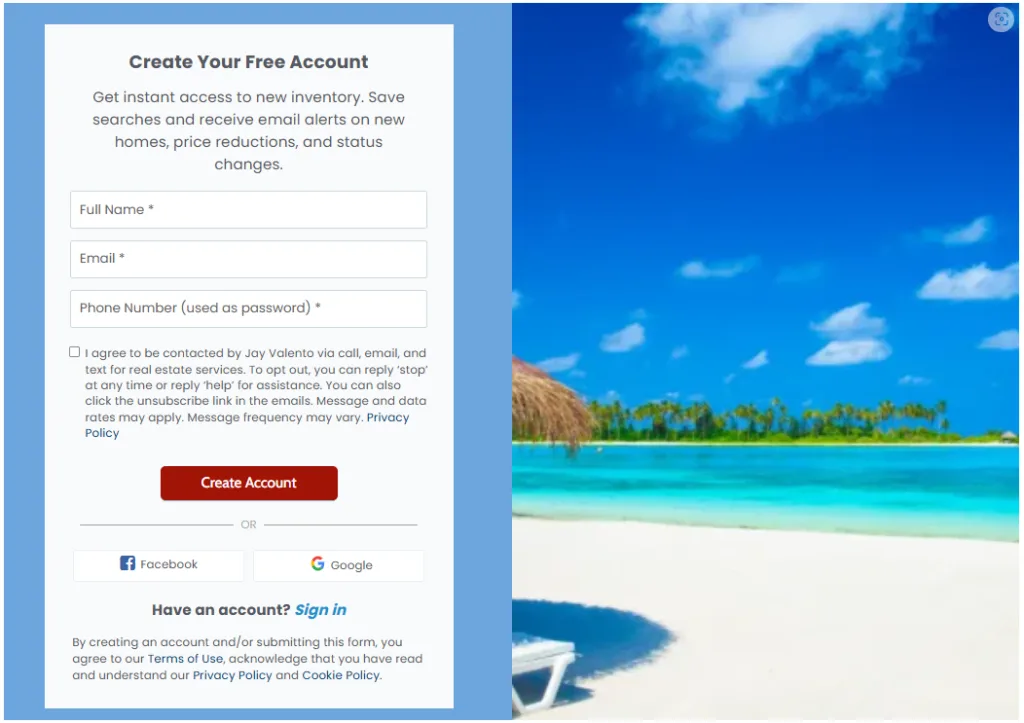
Only ask for the basics—name, email, phone—to keep things easy. Add a few secondary CTAs for visitors who aren’t ready to reach out, like “Save this listing” or “Sign up for listing alerts.” Let users save listings to their account and connect listing alerts to saved searches, so you keep leads coming back. Connect your contact forms to your CRM, so new leads go straight into your nurture sequences.
Use UTM tags on your CTAs so you can see which pages actually bring in the best leads when you check your analytics.
Addressing Registration Prompts and Saved Searches
Don’t hide everything behind a registration wall. If you do need people to register, tell them exactly what they’ll get—like “Get full address and photos” or “Save searches and receive listing alerts.”
Let visitors see some basic info first, then nudge them to sign up for more. For main actions like scheduling a showing, keep registration optional.
When you ask for registration, keep the form short and offer social sign-on to make things faster. Add a quick note about how you’ll use their email for alerts or saved searches.
Let people create saved searches without forcing them to register fully; then, before you send alerts, prompt them to save results to a profile. Connect saved searches and alerts to your CRM so you can follow up and see what people are looking at over time.
Zillow really changed how people use online listings. If you want a deeper dive into the long-term impact, check out Zillow’s effect in Long Beach.
Best Practices for Blogging Strategy and IDX Page Promotion
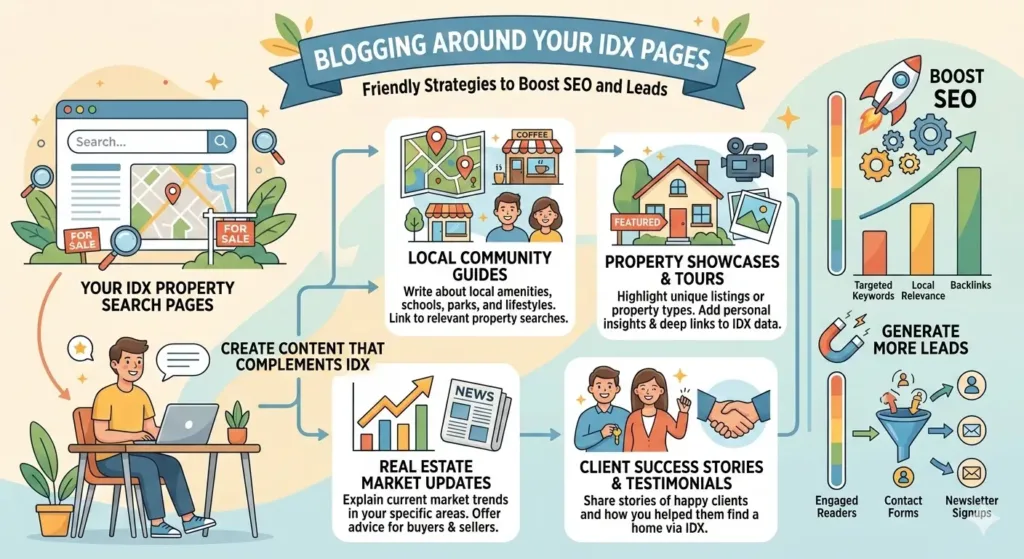
Use your blog to send people to specific IDX pages and tools. Make sure your calls to action are clear, your on-page tools are helpful, and you’re tracking what brings in organic visitors and impressions.
Leveraging Landing Pages and Interactive Maps
Create landing pages focused on neighborhoods, developments, or price ranges, and link them straight to matching IDX search results. Use a strong headline, a quick benefit statement, and one bold CTA like “View Homes in Naples Island Homes [Neighborhood].”
Embed an interactive map or map search that shows pins and updates as users zoom or filter. That keeps folks on the page longer and gives you more leads from IDX forms.
Optimize your landing pages for local keywords and add schema like address and geo-coordinates. Link to these pages from your blog posts, and track visits and impressions to see which ones are working and which need better headlines or images.
Integrating Buyer Guides and Mortgage Calculators
Write buyer guides that actually answer real questions—stuff like down payment sizes, closing costs, and timing for your area. Link key terms in your guide to relevant IDX pages, like “homes under $400k,” so readers can jump from learning to browsing right away.
Drop a mortgage calculator near the IDX listings or in your buyer guide. Let users enter price, down payment, and rate, then show the monthly payments and add a CTA to view matching IDX listings.
Keep the calculator simple and mobile-friendly. If someone wants a detailed amortization or to save a search, ask for basic contact info—this helps you get better leads and connects your educational content to your marketing workflow.
Measuring Performance and Continuous Improvement
Set up tracking for impressions, clicks, and conversions for each blog-to-IDX path. Use UTM tags on links in posts and landing pages so you know which blog article actually brought in a visit or a lead.
Keep an eye on bounce rate and time on page for posts that send people to IDX pages. If a page gets plenty of impressions but nobody clicks, try swapping out the CTA text, image, or maybe just moving the map search higher up.
Check performance weekly for the first 90 days after publishing.
#showcaseidx #blogging #seorealestate #listings