
So, what is the difference between MLS and IDX? If you work in real estate or plan to build a property website, you’ll run into MLS and IDX a lot. They’re connected, but they aren’t the same thing.
Knowing the difference helps you use each tool the right way.

Public vs Real Estate Database: What is the difference between MLS and IDX?
MLS is a private database where real estate agents share and manage property listings. IDX is the tool that displays those listings on public websites.
Agents and brokers use the MLS to add, update, and view property data. IDX pulls approved MLS data and shows it on your website so buyers can search homes online.
Key Takeaways
- MLS stores and manages property listings for licensed agents and brokers.
- IDX displays approved MLS listings on public-facing real estate websites.
- You need both to manage listings and show them online effectively.
Understanding Multiple Listing Service (MLS)

The Multiple Listing Service (MLS) is the main database real estate professionals use to share property listings. It sets rules for how agents post, update, and access listing information within a local market.
Core Functions of MLS
The MLS acts as a shared mls database where brokers and agents post properties for sale. When you add a listing, other members in your local MLS can see it and offer it to their buyers.
This system supports cooperation between brokers and outlines how commissions are shared when another agent brings the buyer.
MLS systems store key details such as:
- Price and status updates
- Property features and photos
- Showing instructions
- Agent remarks
- Seller information
- Offer and closing information
You use MLS data to search for homes that match your client’s needs. Filtering by price, location, size, and other details makes it easier to give buyers accurate and current options.
Local MLS organizations enforce rules on how quickly you must update status changes and how you present listing information. These rules help keep data reliable and fair.
Who Can Access MLS Data?
MLS access is limited to licensed real estate professionals. If you’re a member of a local MLS, you can log in and view full listing details.
The general public doesn’t get direct access to the full MLS database. Public websites show parts of MLS listings, usually using IDX tools to display that information.
As a member, you can:
- View private agent remarks
- Access full property history
- See showing instructions
- Review commission details
These details don’t appear on public portals. This access helps you advise clients with more complete information.
Each local MLS sets its own membership and access policies. If you work across regions, you might need to join multiple MLS databases to see listings in different areas.
MLS Listings and Database Features
MLS listings contain detailed and structured property data. When you enter a property, the MLS system requires specific fields like square footage, lot size, number of bedrooms, and property type.
This standard format keeps mls data consistent and allows you to run accurate searches and compare properties side by side.
Many MLS systems include tools such as:
- Auto email alerts for clients
- Saved searches
- Market reports
- Listing history tracking
You can also upload photos, virtual tours, and documents. The MLS database stores status changes like active, pending, and sold.
Accurate data entry matters. MLS rules often require you to update listing status within a set time frame. This helps everyone avoid outdated information.
MLS Membership Basics
To join a Multiple Listing Service, you usually need an active real estate license. You also have to affiliate with a brokerage that holds MLS membership.
Most local MLS organizations charge:
- An initial setup fee
- Ongoing monthly or quarterly dues
- Technology or lockbox fees
When you join, you agree to follow MLS rules and data standards. These rules cover advertising, data sharing, and listing accuracy.
Membership gives you full mls access and the ability to post your own listings. Without it, you can’t directly add properties to the MLS database or view complete listing details.
If you plan to work seriously in a market, MLS membership is pretty much essential. It connects you to other brokers and gives you reliable, up-to-date listing information.
Exploring Internet Data Exchange (IDX)

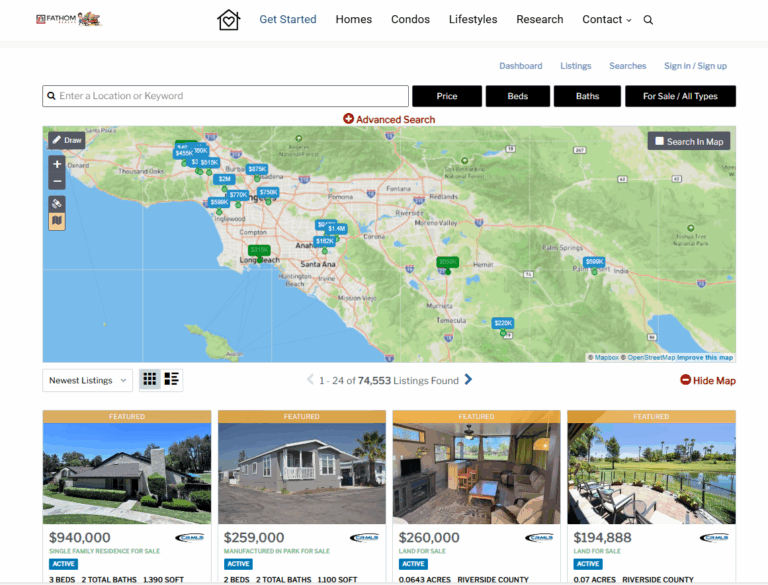
Internet Data Exchange (IDX) lets you display MLS listings on your real estate website through an approved data feed. It connects your site to the MLS, adds search tools, and follows strict rules to protect buyers, sellers, and brokers.
How IDX Connects to MLS
IDX works as a bridge between the MLS database and your public website. The MLS stores the full listing data, and an IDX feed pulls approved fields from that database to your site.
You don’t access the MLS directly through your website. Instead, your IDX provider connects to the MLS and delivers an MLS feed that updates your online property listings on a regular schedule.
This setup is the key difference in IDX vs MLS. The MLS is the private system agents use to enter and manage listings. IDX is the display layer that lets you show those listings to the public.
When you set up IDX integration, your provider maps MLS data to your website. That process keeps prices, photos, and status changes current without manual updates.
IDX Website Features for Agents
An IDX-powered website does more than show property listings. It gives your visitors tools to search, filter, and save homes.
Most IDX software includes:
- Advanced property search with filters for price, beds, baths, and location
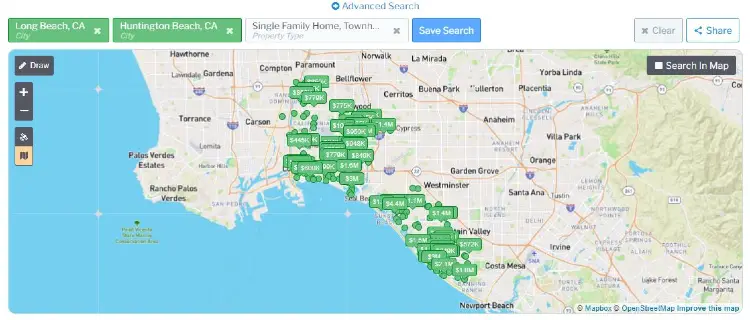
- Interactive maps
- Auto-updating IDX listings
- Saved searches and email alerts
- Lead capture forms tied to each listing
These features turn basic agent websites into full search platforms. Buyers can browse online property listings just like on the big real estate sites.
Many IDX providers also offer branding tools. You can add your logo, contact details, and custom pages. That keeps your name in front of visitors while they search MLS listings on your site.
Rules and Compliance for IDX
IDX follows strict rules set by each MLS and local real estate board. These rules control how you display MLS listings and what data you can show.
For example, you must:
- Show the listing brokerage name
- Update data on a required schedule
- Remove listings when they’re no longer active -hopefully your IDX software does that or displays it as sold
- Follow fair housing and copyright rules
An IDX listings broker or provider builds these rules into the IDX feed. That reduces errors on your website.
You can’t change listing details from other brokers. The MLS stays the source of truth. IDX just displays approved data in a public format.
Benefits of IDX for Property Listings
IDX helps you keep visitors on your own site. Instead of sending buyers to third-party portals, you give them direct access to MLS feeds through your website.
This setup supports lead capture. When users request a showing or save a home, you collect their contact details.
IDX integration also saves time. You don’t need to upload listings one by one. The MLS feed updates your IDX listings automatically.
With a strong IDX website, you offer live property listings, clear search tools, and accurate data. That makes your real estate website more useful—and, honestly, easier for buyers to trust.
Key Differences Between MLS and IDX

MLS and IDX work together, but they serve different roles. One stores and manages listing data, while the other shows that data to the public on your website.
MLS as the Source, IDX as the Display
The MLS (Multiple Listing Service) acts as a private database. It collects and stores property listings entered by licensed agents and brokers in a specific area.
When you join an MLS through membership, you can add listings, update them, and view detailed data. This MLS database includes pricing history, showing instructions, agent remarks, and status changes.
IDX (Internet Data Exchange) doesn’t create listings. It pulls approved data from the MLS feed and displays it on your public website as IDX listings.
In simple terms:
| MLS | IDX |
|---|---|
| Source of listing data | Tool that displays listing data |
| Private, agent-only system | Public-facing website feature |
| Requires MLS membership | Requires IDX approval and setup |
If you want to share listings with consumers online, you need IDX. If you want to enter and manage listings, you need MLS access.
Data Access and Coverage
The difference between MLS and IDX becomes clear when you look at access.
The MLS gives you full data access as a member. You can see complete property details, agent-only notes, compensation information, and listing history. This data stays inside the MLS system.
IDX only shows a portion of that data to the public. It follows MLS display rules, which limit what you can show. For example, private remarks and some commission details never appear in IDX listings.
Coverage also depends on your MLS membership. Each MLS serves a defined region. If you belong to more than one MLS, you might need separate IDX feeds for each one.
You can’t display listings from an MLS unless you have permission and follow its IDX rules.
Customization and Branding Options
The MLS system itself offers limited branding options. It focuses on data entry, accuracy, and cooperation between brokers.
IDX gives you more control over how listings appear on your website. You can:
- Match listing pages to your brand colors
- Add custom search filters
- Highlight featured properties
- Capture leads through forms
Even so, you have to follow MLS display rules. Many MLSs require clear broker attribution on every listing. That means you must show the listing broker’s name and sometimes their logo.
You can’t remove required fields or alter listing data in a way that misleads users. IDX allows design flexibility, but it doesn’t let you change the facts of a listing.
Differences in Rules and Restrictions
MLS membership has pretty strict rules. You’ve got to enter accurate data, update listing status fast, and hit all the right deadlines.
The MLS enforces these standards to keep the database clean and reliable.
IDX comes with its own set of rules for how you display listings online.
Common IDX requirements include:
- Showing broker attribution
- Displaying listing updates within a set time frame
- Avoiding false or edited listing information
- Following fair housing guidelines
MLS display rules also limit how you sort or promote listings. You can’t hide other agents’ listings to favor your own without proper disclosure.
Break the rules—MLS or IDX—and you could face fines or lose access. You really have to stay sharp and follow both systems if you want to share listings the right way.
How MLS and IDX Work Together in Real Estate

MLS and IDX do different things, but they’re connected. The MLS stores all the property data, and IDX brings that data to your website so buyers can search and browse.
Data Transfer and Integration
The MLS acts as the main database for local property listings. Agents enter and update details like price, photos, square footage, and status.
This creates a single source of accurate MLS data for your market.
IDX integration pulls approved MLS feeds and puts them on your website. The data updates on a schedule—sometimes every few minutes, sometimes every few hours, depending on MLS rules.
This keeps your listings current without you having to update everything manually.
You don’t own the MLS data. Your IDX provider connects to the MLS and displays listings under agreed terms.
This setup lets you show active listings, pending sales, and sometimes sold data, depending on what your MLS allows.
Role in Lead Generation and Marketing
When you add IDX to your site, you turn your website into a property search tool. Visitors can search by price, location, features, and more.
That keeps users on your site instead of sending them off to the big listing portals.
This control helps you with lead generation. You can require users to create an account to save searches, request showings, or get alerts.
Each action gives you contact info and a clearer idea of what buyers want.
IDX also helps your marketing. You can create neighborhood pages, link blog posts to live listings, and share search results in emails.
Since the listings come straight from MLS feeds, your site shows up-to-date info that buyers trust.
Compliance and Display Guidelines
MLS organizations set strict rules for how you display listings through IDX. You have to show accurate details, avoid editing key fields, and include required disclaimers or brokerage info.
Most MLSs require you to display the listing brokerage name and follow branding rules. Some limit how you sort listings or show sold data.
Your IDX integration has to follow these technical and legal standards. You also need to refresh MLS data on a required schedule.
If your site shows outdated info, you risk penalties or losing access. Sticking to MLS and IDX guidelines protects your license and keeps your site compliant while you promote your listings.
Choosing and Using IDX Solutions
You need an IDX solution that connects to your MLS, fits your website, and supports lead capture. The right choice depends on pricing, features, customization, and how well the system helps you manage saved searches and email alerts.
Evaluating IDX Providers
Start by confirming that the IDX provider supports your local MLS. Not all IDX providers cover every market, and some charge extra for multiple MLS feeds.
Compare these key factors:
- MLS coverage and data accuracy
- Lead capture tools like saved searches and email alerts
- Mobile responsiveness
- Page speed and SEO settings
- Monthly cost and setup fees
Ask how listings update. Most systems pull data directly from the MLS at set intervals.
Frequent updates keep your site accurate and help avoid confusing clients.
Check how the system handles registration. Some IDX software forces users to sign in before viewing listings, while others let people browse freely and prompt sign-up later.
Pick what fits your lead strategy best.
If you’re an IDX broker, see if the platform supports team accounts and agent subdomains. That’s useful for managing branding across your brokerage.
Customization and IDX Software Options
IDX software ranges from simple plug-ins to fully custom builds. Your choice affects cost, control, and flexibility.
Off-the-shelf IDX solutions install quickly and cost less. They work well for most agents.
You get standard search tools, map views, saved searches, and automated email alerts. Custom IDX builds give you more design control.
Developers can connect through APIs and shape how listings display. This option is best for large brokerages with special branding needs.
Many agents use hosted platforms like Showcase IDX. These systems combine search tools, CRM features, and lead tracking in one dashboard.
When comparing solutions, check:
- Can you edit meta titles and URLs?
- Does the system create indexable listing pages?
- Can users filter by school district, price, and property type?
Strong customization makes for a better user experience and helps your SEO long-term.
Popular IDX Vendors and Tools
Several IDX vendors serve different needs and budgets. Some focus on SEO, others on design or CRM integration.
Common tools include:
- Showcase IDX
- IDX Broker
- Diverse WordPress plug-ins
- Brokerage-level enterprise platforms
Each IDX provider connects to MLS data but can differ in layout options, map search quality, and lead routing.
For example, IDX Broker offers flexible widgets and advanced search filters. Some platforms include built-in CRM tools that track saved searches and trigger email alerts when listings change.
You should test demos before you commit. Click through property searches, register as a user, and see how leads move through the system.
Your IDX solution should make it easy for visitors to search, save homes, and contact you without friction.
Benefits and Considerations for Real Estate Professionals
MLS gives you access to complete listing data. IDX helps you show that data on your own agent website.
When you use both well, you improve lead capture, boost online visibility, and stay within industry rules.
Lead Capture and Client Engagement
IDX turns your website into an active property search tool, not just a digital brochure. Home buyers can search listings, filter results, and view details without leaving your site.
You can set up features such as:
- Saved searches
- Email alerts
- Property updates based on price changes
- Requests for showings
These tools keep leads coming in. When a buyer saves a search or signs up for alerts, you collect contact details through built-in forms.
This keeps clients engaged. They come back to your site to track new listings instead of heading to national portals.
You stay connected through automatic updates, which helps you respond quickly and build trust.
SEO and Online Visibility
IDX pages can increase the number of searchable pages on your site. Each listing and search result creates new content for search engines to index.
Still, don’t rely on IDX alone for rankings. So many agents share the same listing data that your pages can end up looking pretty similar to everyone else’s.
You’ll get better results if you add local content around your listings. Create neighborhood guides or market updates and connect them to your search pages.
Strategies like blogging around IDX help you attract buyers searching for specific areas.
This approach supports:
- Stronger local SEO
- More targeted traffic
- Higher-quality inquiries
You get more visibility and connect with serious homebuyers.
Staying Compliant with MLS and IDX Rules
MLS data comes with strict rules. Your MLS sets guidelines for how you display listings, update data, and show broker information.
You must follow rules such as:
- Displaying the listing brokerage clearly
- Updating data on the required schedule
- Avoiding edits to listing details
- Following fair housing standards
IDX agreements also limit how you use the data. You can’t claim another agent’s listing as your own or change details without approval.
If you ignore these rules, your MLS can fine you or suspend access. Staying compliant protects your license and reputation.
It also makes sure buyers see accurate and current listing information.
Frequently Asked Questions
MLS and IDX have different roles in real estate. One controls who can access listing data, and the other controls how that data shows up on your public website.
Who can access an MLS, and who typically can’t?
Real Estate professionals and not the general public.
How does IDX display real estate listings on a website?
IDX uses a data feed from the MLS. It takes approved listing details and puts them on your website in a searchable format. When you add IDX to your site, visitors can search by price, location, property type, and other filters. The listings come from the MLS, but IDX presents them to the public.
Do IDX listings update in real time, or is there a delay?
Most IDX feeds update on a set schedule. Some update every few minutes, while others refresh a few times per day.
Your MLS sets the update frequency, so small delays can happen between a status change in the MLS and what shows up on your site.
Why might some properties appear in the MLS but not show up on IDX?
Some listings are marked as “office exclusive” or “withheld from IDX.” In those cases, the MLS keeps the listing private.
Sellers can ask for limited exposure. If they choose that, the property will show up in the MLS for agents but not on public IDX websites.
Data errors or rule violations can also keep a listing from showing up through IDX.
Is an IDX feed the same as a data license, or are they different agreements?
An IDX feed isn’t the same as a full data license. IDX gives you permission to display certain MLS listings on your website under specific rules.
A data license might allow broader use of MLS data, like analytics or third-party products. These agreements usually have separate terms and fees.
Your MLS decides what each agreement covers.
What do agents and brokers need to set up IDX on their website?
First, you need active MLS membership and approval to use IDX. Most MLS systems ask you to sign an IDX agreement.
You’ll also need a website that can handle IDX integration. Usually, that means teaming up with a web provider who connects to your MLS data feed.
Your broker might need to sign off on the setup too. And don’t forget—you have to follow all the display rules, like showing your brokerage name and listing courtesy info.