
Choose the best software and learn how to attract luxury leads or local clients with ease. Start today!
Picking the right website platform can seriously impact your real estate business. As a realtor, you want a site that shows MLS listings, grabs leads, and nudges visitors toward becoming clients. IDX (Internet Data Exchange) realtor websites let you pull Multiple Listing Service data straight onto your own site, giving buyers a reason to search for homes with you instead of heading to Zillow or Realtor.com.
There are dozens of IDX platforms out there, each with its own mix of features and pricing. Some are all about slick design and personal branding; others focus on lead capture and automation. Which one fits best? That depends on your budget, how tech-savvy you are, and what you want out of your business.
I’ve dug into the top IDX platforms to help you see what sets them apart. Whether you’re a new agent watching every dollar or a seasoned team looking for more advanced tools, you’ll get a no-nonsense look at features, costs, and which platforms actually deliver value.
Key Takeaways
- IDX websites let realtors show MLS listings on their own sites to compete with big portals and catch more leads
- Options range from affordable DIY setups at $59/month to full-service solutions with built-in CRM and automation
- The best IDX sites offer easy property search, strong lead capture, and custom branding that shows off your expertise
What Are IDX Realtor Websites?
IDX realtor websites pull live property listings from your local MLS right onto your branded site. This means buyers can search the whole market without leaving your domain, keeping them engaged with you instead of bouncing to the big guys.
Definition of IDX and Internet Data Exchange
Internet Data Exchange (IDX) is basically a set of rules and tech standards that let MLS members display each other’s listings on their own websites. When you subscribe to an IDX feed, you’re allowed to show properties from your local MLS directly on your site. The feed updates automatically, often every hour or so.
Unlike adding your own listings by hand, IDX pulls from the entire MLS database, but you have to play by your MLS’s rules. You can filter listings by location, price, or property type, but you need to follow display rules. Most MLSs want you to show accurate data, include other agents’ info, and clearly mark IDX listings.
The Role of IDX in Real Estate Websites
An IDX website gives you your own property search portal. Visitors can browse MLS listings, save favorites, set up search alerts, and get notified when new homes pop up. All of that opens doors for capturing leads.
When someone saves a search or asks for details, the site grabs their email or phone number. That info goes right into your CRM or inbox so you can follow up quickly. Without IDX, you’d only show your own listings. With it, you offer the same inventory buyers see on Zillow or Realtor.com—but under your brand.
Most IDX platforms also create individual pages for each listing. Search engines can index those pages, which helps buyers find your site when they Google an address or neighborhood.
Benefits for Realtors and Clients
IDX realtor websites keep visitors on your site longer. When buyers can search the whole market in one spot, they stick around and explore instead of bouncing to a competitor. That extra engagement builds trust and ups the odds they’ll reach out to you.
For clients, an IDX site means access to the same up-to-date data realtors see in the MLS. They can check photos, read descriptions, see days on market, and compare homes side by side. Saved searches and email alerts let them track new listings without hopping between sites every day.
You also snag some SEO perks. Each property page, neighborhood guide, and search result can show up in Google. That visibility brings in organic traffic and helps you look like the local expert buyers want when they’re ready to start house hunting.
Core Features of IDX Realtor Websites
IDX realtor websites need the right tools to help buyers find homes and help agents catch leads. The right features make it easier to search for properties, automate lead follow-up, and create a professional online presence.
Property Search and MLS Integration
MLS integration brings live listings straight to your real estate website. Honestly, this is the backbone of any IDX system because you get automatic updates in real time—no manual entry needed.
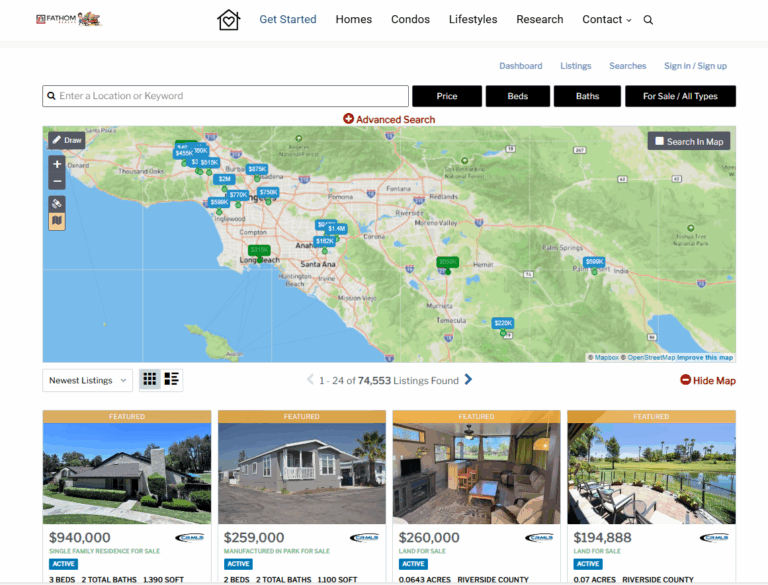
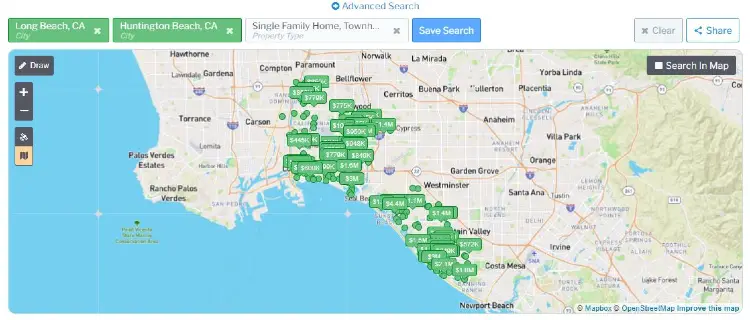
Property search tools let visitors filter homes by price, bedrooms, bathrooms, and location. Interactive maps show where properties are in relation to schools, shopping, and neighborhoods. Map search lets buyers zoom into specific areas and see all available listings at once.
Key search features include:
- Polygon search so users can draw custom boundaries
- School district searches for families
- Neighborhood and community search options
- Lifestyle categories (waterfront, active, business districts)
Home search works best when buyers have options—some want to search by address, others by map, and some by amenities.
Lead Capture Tools and Automation
Lead capture features turn website visitors into contacts you can actually follow up with. When buyers save searches, favorite homes, or request property info, they leave their details behind.
Lead capture usually means registration forms, property inquiry buttons, and saved search options. I connect these to my CRM to keep every lead organized and tracked automatically.
Drip campaigns send automated emails to leads based on what they’re looking at. If someone checks out waterfront properties, they’ll get new waterfront listings as soon as they’re live. That keeps me top of mind without having to chase every lead myself.
Essential automation features:
- Automatic email alerts for new listings
- Saved search notifications
- Property update emails
- Lead tracking and scoring in CRM
User-Friendly Design and Custom Branding
Custom branding helps your real estate website stand out from others using the same IDX backend. I add my logo, colors, and some unique content to build a distinct, professional vibe.
The design has to look good on phones, tablets, and desktops since buyers use all sorts of devices. Simple navigation is key—no one wants to click through endless menus to find a listing.
SEO optimization helps my site show up in search results when buyers hunt for homes in my area. That means optimized property pages, local content, and fast load times. Good IDX systems make sure each listing and neighborhood page gets a unique URL, so search engines can find and index everything.
Top IDX Website Platforms for Realtors
Some platforms really stand out for delivering MLS data, capturing leads, and supporting agent branding. Placester is budget-friendly with simple templates, AgentFire is all about custom design and local content, Agent Image brings high-end branding, and iHomefinder offers flexible IDX tools for lots of website builders.
Placester
Placester starts at $59 a month and gives you IDX search, lead capture forms, and basic SEO tools. It uses a drag-and-drop editor, so you can tweak templates without knowing code.
The Agent Essentials plan is $566 a year. Agent Plus runs $758 per year. Agent Premier is $1,238 annually.
Placester tacks on a $25/month IDX Support Fee for each active MLS contract. That covers the cost of keeping your listing feeds compliant and up to date.
You get an IDX Manager tool to track feed approvals across different MLSs. Lead capture works through saved searches and property alerts that ping buyers when new listings match what they want.
Teams can get plans starting at $199/month. Brokers pay between $399 and $599 monthly, depending on agent count.
AgentFire
AgentFire is $149/month plus a $700 setup fee for theme-based sites. It runs on WordPress and comes with tools for building hyperlocal content focused on specific neighborhoods.
Area Guides pull in listings, Yelp data, and market stats for each neighborhood. ClickMaps let visitors explore by clicking right on a map.
Custom sites start at $149/month, with setup fees of $2,500 or more. The AI Edge design framework helps you create content for blogs and social posts automatically.
AgentFire Plus adds $50/month for ongoing site tweaks and SEO improvements.
This platform works best for agents who want to look like the local expert. It integrates with IDX Broker and Showcase IDX, so you have options for MLS data feeds.
Agent Image
Agent Image has four tiers, from template-based to fully custom designs. The Agent Image X plan is $99.99/month with a $599.99 setup fee.
Higher tiers need a custom quote. Semi-custom and Imagine Studio options look like they belong in a magazine, but the pricing is definitely premium.
It uses iHomefinder for IDX integration, which gives you basic search but doesn’t have some of the advanced features you’ll find in platforms like Real Geeks or CINC.
Agent Image offers optional SEO and PPC management services. You can bundle web design with ongoing marketing under one contract.
There’s no built-in CRM, so you’ll need to connect something like BoomTown or your own system.
iHomefinder
iHomefinder offers IDX tools that work with WordPress, custom sites, and standalones. iHomefinder Max gives you advanced search, including map-based browsing and polygon drawing.
Pricing depends on MLS coverage and what features you pick. The platform is more about search functionality than full website building.
iHomefinder Max includes mobile-friendly design and automatic listing updates. Lead capture forms pop up when visitors save searches or ask for property info.
This system fits agents who already have a website and just want to add IDX. It connects with most CRM platforms, including those used by Real Geeks and others.
Monthly costs usually run $40–$100, depending on MLS feeds. Setup fees apply for custom integrations and advanced mapping.
IDX Website Functionality and Customization
Modern IDX websites plug into CRM systems to manage leads, send property alerts tailored to buyer preferences, and build specialized landing pages for targeted marketing. These features turn a basic property search site into a full lead gen and client management machine.
IDX Integration with CRM Systems
IDX integration with CRM systems grabs visitor info when someone searches for homes or signs up for updates. The connection sends lead data straight into your CRM—no manual entry needed.
AI-powered CRM tools watch visitor behavior and score leads based on activity. I can see who’s checking out multiple listings or coming back often. That lead scoring helps me figure out who to follow up with first.
Lead management gets way easier when IDX and CRM work together. Contact details, search preferences, and property views all sync up. A lot of platforms offer these CRM integrations built in:
- Market Leader
- Real Geeks
- BoomTown
- kvCORE
This integration means I don’t have to enter data twice and I won’t miss a potential client inquiry.
Property Alerts and Market Reports
Property alerts ping registered users when new listings match what they want. I set these up to send automatically by email or text. The alerts keep buyers coming back to my site instead of wandering off to national portals.
Market reports use live MLS data to show trends, average prices, and inventory in a neighborhood. These reports help me look like a local market expert. I make them for specific areas or property types to attract sellers checking their home’s value.
Market report pages double as lead capture. Visitors drop their email to get detailed stats and comps.
Landing Pages and Single Property Websites
Landing pages target specific buyer groups or property types. I’ll make separate pages for first-time buyers, luxury homes, or certain neighborhoods. Each page has relevant listings and messaging that speaks right to that audience.
A single property website spotlights one listing with its own URL. These are great for listing presentations and luxury properties that need extra marketing. Usually, they include photo galleries, virtual tours, neighborhood info, and a contact form.
I use these special pages for social ads and email campaigns. The focused content tends to convert better than just sending people to my homepage.
Optimizing IDX Realtor Websites for Lead Generation
Getting traffic to your IDX site is pointless if visitors don’t turn into leads. The real trick is optimizing for search, using automated follow-up, and adding features that turn browsers into real prospects.
SEO Strategies for Real Estate Websites
I always start with keyword research, zeroing in on location-based terms that buyers actually type into Google. Phrases like “homes for sale in [neighborhood]” or “[city] real estate listings” pull in the right kind of traffic to my IDX pages.
Each property listing needs more than the generic MLS blurb. I write original descriptions that use relevant keywords in a way that sounds natural, calling out the features buyers really care about. Meta titles and descriptions for these pages should be specific and catch the eye—no vague copy here.
Key technical SEO elements I focus on:
- Fast page load times (under 3 seconds, ideally)
- Mobile-responsive design that just works everywhere
- Structured data markup for all listings
- Clean URLs with location keywords
- Consistent content updates—think blog posts or local market reports
Local SEO is a huge deal for real estate. I make sure my site links to my Google Business Profile and features neighborhood guides, school stats, and local data that show I know the area inside and out.
Marketing Automation and Drip Campaigns
I connect my IDX website to a real estate CRM—usually with Zapier—so I never lose a lead. Every form fill, property inquiry, or saved search automatically lands in my follow-up system, no manual work needed.
Drip campaigns let me stay in touch with leads over time. I build different email sequences depending on what people do on my site. For example, someone searching for waterfront homes gets a different follow-up than someone browsing downtown condos.
My most effective automated sequences:
- Welcome emails sent within 5 minutes of signup
- Listing alerts based on saved searches
- Market updates and neighborhood news
- Price drop alerts for properties they viewed
- Tips and info about buying or selling
Automation handles the repetitive stuff, which frees me up to actually talk with engaged leads. The trick is making each message feel like it’s written just for them.
Conversion Optimization Best Practices
I place lead capture forms where they make sense—property detail pages, search results, or after someone’s looked at a few listings. I hate intrusive pop-ups, so I avoid those.
Short forms always work better. I just ask for name and email up front, then gather more info later, once we’re chatting. Offering something useful in exchange (like a free report) really boosts conversions.
Lead magnets that work for me:
- Home valuation tools for sellers
- Buyer guides tailored to my local market
- Access to off-market listings
- Neighborhood comparison reports
I’m always tweaking call-to-action buttons and form placements. Even small changes—like a different button color or wording—can bump conversions by 20% or more.
Live chat helps me catch visitors with questions in real-time. Even a simple chatbot that grabs contact info after hours is better than letting those leads slip away.
IDX Technology, Coverage, and Compliance
IDX tech connects your site to MLS feeds so listings show up automatically. How well this works depends on which MLSs you can tap into, how fast the data updates, and what you’ll pay to set it up and keep it running.
MLS Coverage and Local Regulations
Not every IDX provider covers every MLS. I always check which MLSs operate in my area and make sure my provider supports them before I sign up.
Some providers cover hundreds of MLSs across the country. Others stick to certain regions. If I work in multiple markets, I need broad MLS access—no way around it.
Each MLS has its own rules for displaying listings. Some want specific attribution text, others limit which fields I can show or search by. My IDX provider should handle these compliance headaches in the background so I don’t accidentally break the rules.
Local regulations also shape what I can display. Some states restrict certain property details or require disclaimers. The IDX feed needs to follow both MLS rules and state laws to keep my site out of trouble.
Data Updates and IDX Feed Accuracy
IDX feeds update at different speeds, depending on the MLS and provider. Most refresh every 15 minutes to an hour, but some are as quick as every 5 minutes.
Faster updates mean my site shows what’s actually available. If a property goes under contract, I want that reflected ASAP. Slow updates just frustrate visitors who ask about homes that are already gone.
The IDX pulls data straight from the MLS—price changes, new photos, open house times, all of it. I always double-check that my provider’s feed includes every field I want to display.
Setup Costs, Pricing, and Customer Service
Most IDX providers charge a setup fee, usually somewhere between $0 and $500. Monthly costs run from $40 to $300 depending on features and how many MLS feeds you need.
Some roll the setup fee into your first month, others drop it completely. I always ask about extra fees for additional MLSs or premium add-ons.
Common pricing factors:
- Number of MLS feeds
- Traffic limits
- Included lead capture tools
- Mobile app access
- Custom design options
Customer service really matters when things break. I look for providers with phone support, live chat, or at least an email reply within 24 hours. Some only offer ticket-based support, which can be slow and, honestly, a pain.
Advanced Tools and Resources for IDX Realtor Websites
Modern IDX platforms do more than just display listings—they help visitors make smart decisions and keep people on your site longer. You get financial calculators, local market data, and integrations with the software you already use every day.
Mortgage Calculators and Home Valuation Tools
A mortgage calculator lets buyers figure out their monthly payments without leaving your site. Most IDX platforms include basic calculators for loan amount, rate, and down payment. Some go further and factor in taxes, HOA fees, and insurance.
I’ve found home valuation tools are just as good for capturing leads. Homeowners can punch in their address for an instant estimate, but they have to give their contact info to see the full report. It’s a win-win—real value for them, a lead for me.
The best IDX sites put both tools right on the listing pages. Buyers can quickly see what a payment might look like, and sellers get a fast home value estimate plus my contact info for a professional review.
Neighborhood Guides and Market Insights
Neighborhood guides turn your IDX site into a real local resource. These pages usually pull in data on schools, restaurants, crime rates, and amenities. Some platforms auto-fill this info, others let you add your own text and photos.
Market insights—like median prices, days on market, and trends—belong on area pages, not just listing pages. This positions you as the local expert and gives buyers some real context for their search.
The most useful neighborhood content mixes automated stats with your own perspective. I’ll use auto-generated data as a base, then add my take on new developments, hidden gems, or local changes that numbers alone can’t explain.
Integrations with Third-party Software
CRM integrations make sure every IDX lead flows straight into my follow-up system. Some platforms include built-in CRMs, while others connect to tools like Follow Up Boss or kvCORE. The important thing is automatic syncing—leads shouldn’t fall through the cracks.
Zapier opens up even more integration options. I can set up automations for when someone registers, saves a search, or books a showing. Maybe I send new leads to my email marketing platform, or get a text alert for high-value inquiries. It’s flexible.
I also look for IDX platforms that work with Google Ads and Facebook Pixel. These help me track which marketing channels actually bring in good traffic and retarget visitors who looked at properties but didn’t convert.
Frequently Asked Questions
IDX websites need responsive design and good lead capture tools to really work. Prices vary a lot depending on features and provider, but the right setup can seriously boost your branding and lead generation.
What are the key features to look for in a high-quality IDX realtor website?
Mobile responsiveness is a must. Most buyers are searching on their phones, so the site has to work perfectly everywhere.
Lead capture forms are non-negotiable for turning visitors into clients. I want registration options that don’t put up too many hurdles. The best systems send leads straight to my CRM so I can follow up fast.
Search tools matter more than most agents realize. I want advanced filters—price, beds, location, features. Map-based search is great for helping buyers visualize neighborhoods and narrow down options.
How can one evaluate the best IDX real estate websites available in the market?
First, I check if the provider gives full MLS data access for my area. Some only show partial listings, which is just pointless.
Page speed is huge for both users and SEO. I’ll run demos on my phone and laptop to see how fast listings load. If it takes more than three seconds, I know I’ll lose leads.
I look at customization options to keep my site on-brand. Being able to tweak colors, logos, and layouts helps my site stand out. Customer support is also key when something inevitably goes sideways.
What are the cost implications of integrating IDX on a real estate website?
IDX usually costs $40 to $300 a month, depending on features and provider. Basic plans cover search, but premium ones have custom branding and advanced lead tools.
Setup fees can add $200 to $1,000 upfront. Some providers waive these or roll them into the monthly bill. I also budget for extras like domain registration, hosting, and any MLS fees.
In my experience, it’s worth it. Leads from my own site cost less over time than buying them from places like Zillow, where I’m just one agent among many.
Can you list some top-rated IDX/MLS integration providers for realtor websites?
IDX Broker is one of the most established—reliable feeds, works with WordPress, and more. Showcase IDX is great for agents who want more design control and built-in lead nurturing tools.
iHOUSEweb offers all-in-one websites with IDX baked in, perfect for agents who want everything in one place. Real Geeks and Placester also get high marks for easy interfaces and strong marketing automation.
How does IDX integration benefit the functionality of realtor websites?
IDX turns my site from a digital business card into a real lead generator. Visitors can search the full MLS right on my site, instead of bouncing to Zillow or my broker’s page.
I keep control over my brand and client relationships. When buyers search with me, they see my info—not a bunch of other agents.
The integration gives me valuable data on what people are looking at. I can follow up with listings that match their interests. Automated updates keep everything current without me having to copy-paste every change.
Are there any free IDX website solutions that offer comprehensive services?
Free IDX solutions are out there, but they’ve got some pretty noticeable drawbacks. Most of them slap watermarks on listings, limit how many properties you can show, or force you to display ads for the IDX provider—sometimes right at the top.
Some MLS organizations do give members access to basic IDX feeds without charging extra. You’ll get the property data, but setting it up on your site takes some technical know-how. And honestly, these feeds rarely offer the same search tools or design options you’d get from a paid service.
In my experience, free options are okay as a quick fix for new agents who don’t want to spend much right away. But with all the feature gaps and branding hassles, it’s tough to stick with them long-term if you’re serious about generating leads. When I think about the potential commission from just one closed deal that came through my site, paying for a professional IDX seems like a no-brainer.
Ready to scale? Create the best IDX Realtor Website. Talk to Jay Valento today at 562-413-7655.